Measure Map Pro8.0.6
Publisher Description

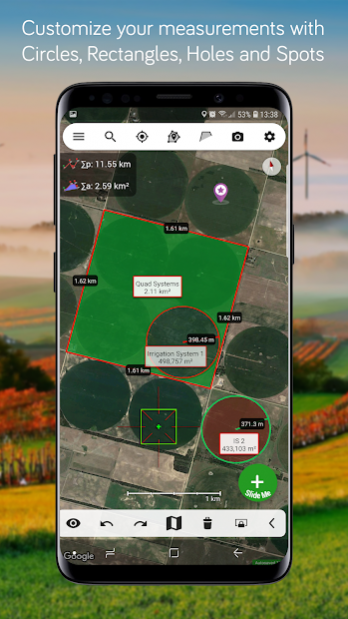
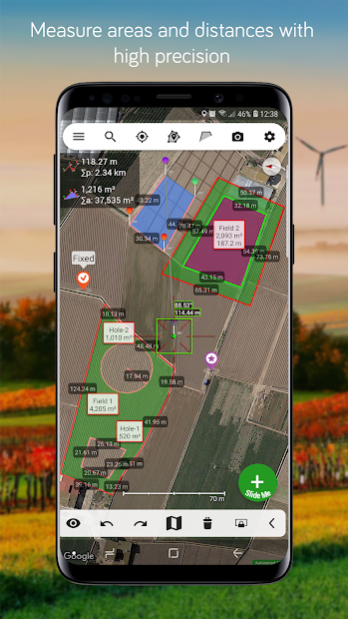
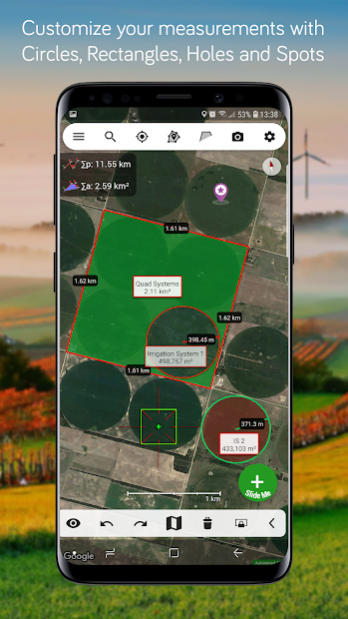
Measure Map Pro lets you quickly and easily measure multiple distances, perimeters and areas with laser sharp precision! It even takes into account the curvature of the earth’s surface. Use it for small areas or large, then share your findings via any sharing app you have on your device.
Calculate surface areas, buildings, plots, floors, forest areas or dimensions for fencing, sports tours, trips or anything you need for field work without having to go to the spot to take measurements. Only one finger to calculate with astonishing accuracy all these measurements over satellite images.
That’s what Measure Map Pro is for, to put a powerful, portable measuring tool right in the palm of your hand. Your Android device can now provide you with totally precise measurements of any distance, from as small as one tenth of a meter to as big as thousands of kilometers or miles, even taking the curvature of the earth’s surface into account when measuring. It does all that, fast and effortlessly.
Just one "Magic" button for all the operations to easily place points without losing it's professional accuracy.
Check out the impressive features you get in Measure Map Pro:
* Create unlimited polygons with unlimited pins.
* Draw shapes: Circles and Rectangles.
* Extra map sources package available in-app-purchase.
* Displays Maps View: Map, Satellite, Hybrid and Terrain.
* 3D Buildings
* Elevation Profile and altitudes of a route.
* Geodesic Segments
* Operations: Add, delete intermediate pins, insert between pins, move pins, get info.
* Multiple areas and routes on screen
* Display of altitude above sea level, azimuth and angle
* Undo and redo operations as needed
* Sharing exported files to any sharing app on your device.
* Calculates azimuth or bearing
* Search for current location, text (villages, places of interest, etc.) or an area or route
* Length units: meters, kilometers, feet, yards, miles, nautical miles, ken, ri, bù, lǐ, link, chain.
* Surface units: square meters and kilometers, ares, hectares, square foot, square yards, square miles, acres, fanegas (Valencian, Castilian or Colombian), tsubo, bu, so, lí, mǔ
* Intermediate distances between pins can be displayed
* Ability to select color and thickness of the perimeter line.
* Ability to select the color and transparency of the selected area.
* Working format: Measure Map, KMZ, KML, CSV, GPX, Image (PNG) and PDF
* Export and import of surfaces and routes via any storage account linked to your device.
* Save to photo album
If precise measurements are important to you, this is the app you need. You won’t find one that is better, more accurate and easier to use.
About Measure Map Pro
The company that develops Measure Map Pro is Blue Blink One, SL. The latest version released by its developer is 8.0.6. This app was rated by 2 users of our site and has an average rating of 4.5.
To install Measure Map Pro on your Android device, just click the green Continue To App button above to start the installation process. The app is listed on our website since 2021-09-19 and was downloaded 277 times. We have already checked if the download link is safe, however for your own protection we recommend that you scan the downloaded app with your antivirus. Your antivirus may detect the Measure Map Pro as malware as malware if the download link to com.globaldpi.measuremappro is broken.
How to install Measure Map Pro on your Android device:
- Click on the Continue To App button on our website. This will redirect you to Google Play.
- Once the Measure Map Pro is shown in the Google Play listing of your Android device, you can start its download and installation. Tap on the Install button located below the search bar and to the right of the app icon.
- A pop-up window with the permissions required by Measure Map Pro will be shown. Click on Accept to continue the process.
- Measure Map Pro will be downloaded onto your device, displaying a progress. Once the download completes, the installation will start and you'll get a notification after the installation is finished.
Program Details
System requirements
Download information
Pricing
Version History
version 8.0.6
posted on 2021-09-19
Important update: Load/Save files is now done externally due to permissions issues on Android OS 11.
- [Added] PDF Preview page
- [Added] Search history
- [Added] Edit distances, altitude, angle and azimuth
- [Fixed] Load external files
- Minor bugs fixed
version 8.0.3
posted on 2021-09-02
Important update: Load/Save files is now done externally due to permissions issues on Android OS 11.
- [Added] PDF Preview page
- [Added] Search history
- [Added] Edit distances, altitude, angle and azimuth
- [Fixed] PDF Export
- Minor bugs fixed
version 7.0.4
posted on 2021-03-10
version 7.0.3
posted on 2021-03-08
- [Added] PDF Preview page
- [Added] Search history
- [Added] Edit distances, altitude, angle and azimuth
- [Fixed] PDF Export
- Minor bugs fixed
version 7.0.2
posted on 2021-03-05
- [Added] PDF Review page
- [Added] Search history
- [Added] Edit distances, altitude, angle and azimuth
- [Fixed] DXF export
- [Fixed] KML load
- [Fixed] Local files not showing
- Minor bugs fixed
version 6.3.0
posted on 2020-08-22
- [Added] PDF Review page
- [Added] Search history
- [Added] Edit distances, altitude, angle and azimuth
- [Fixed] DXF export
- [Fixed] KML load
- Minor bugs fixed
version 6.2.5
posted on 2019-12-10
- [Added] Search history
- [Added] Edit distances, altitude, angle and azimuth
- [Fixed] DXF export
- [Fixed] KML load
- Minor bugs fixed
version 6.2.4
posted on 2019-12-07
- [Added] Search history
- [Added] Edit distances, altitude, angle and azimuth
- [Fixed] DXF export
- Minor bugs fixed
version 6.2.2
posted on 2019-08-18
- New 'Bulk Edit' geometries feature!
- Export DXF files added
- Load multiple files with Multi-select in the File Browser is back
- File Browser issues fixed
- Load Kml files fixed
- Dropbox fixed
- App freezes and crashes while editing fixed.
- Minor bugs fixed
version 6.2.1
posted on 2019-08-04
- New 'Bulk Edit' geometries feature!
- Export DXF files added
- Load multiple files with Multi-select in the File Browser is back
- File Browser issues fixed
- Load Kml files fixed
- Contour Layers fixed
- StreetView crash fixed
- App freezes and crashes while editing fixed.
- Minor bugs fixed
